Keep Training and Curriculum Content Accurate.
Change Happens. Knowledge Keeps Up.
Upload any training file — SCORM package, video, PDF, help doc, or course export. Our AI scans it against the latest product and policy sources and emails you a drift report within 24 hours. Free. No account required.
Trusted by teams at

Your training content is always one change behind.
Product updates ship. Courses don't follow.
Policies change. Certifications stay stale.
Audits surface the gap no one saw coming.
Content doesn't just age. It piles up.
Outdated
names the old price, the old policy, the workflow you retired
Duplicate
three versions of the same course, none of them owned
Broken
dead links, missing media, tools you already sunset
Unowned
nobody's name on it, nobody updating it
Compliance-risky
out of step with the regulation it was built for
Every one of these quietly teaches people the wrong thing.
How It Works
Five steps from drift to done.
Scan your training content
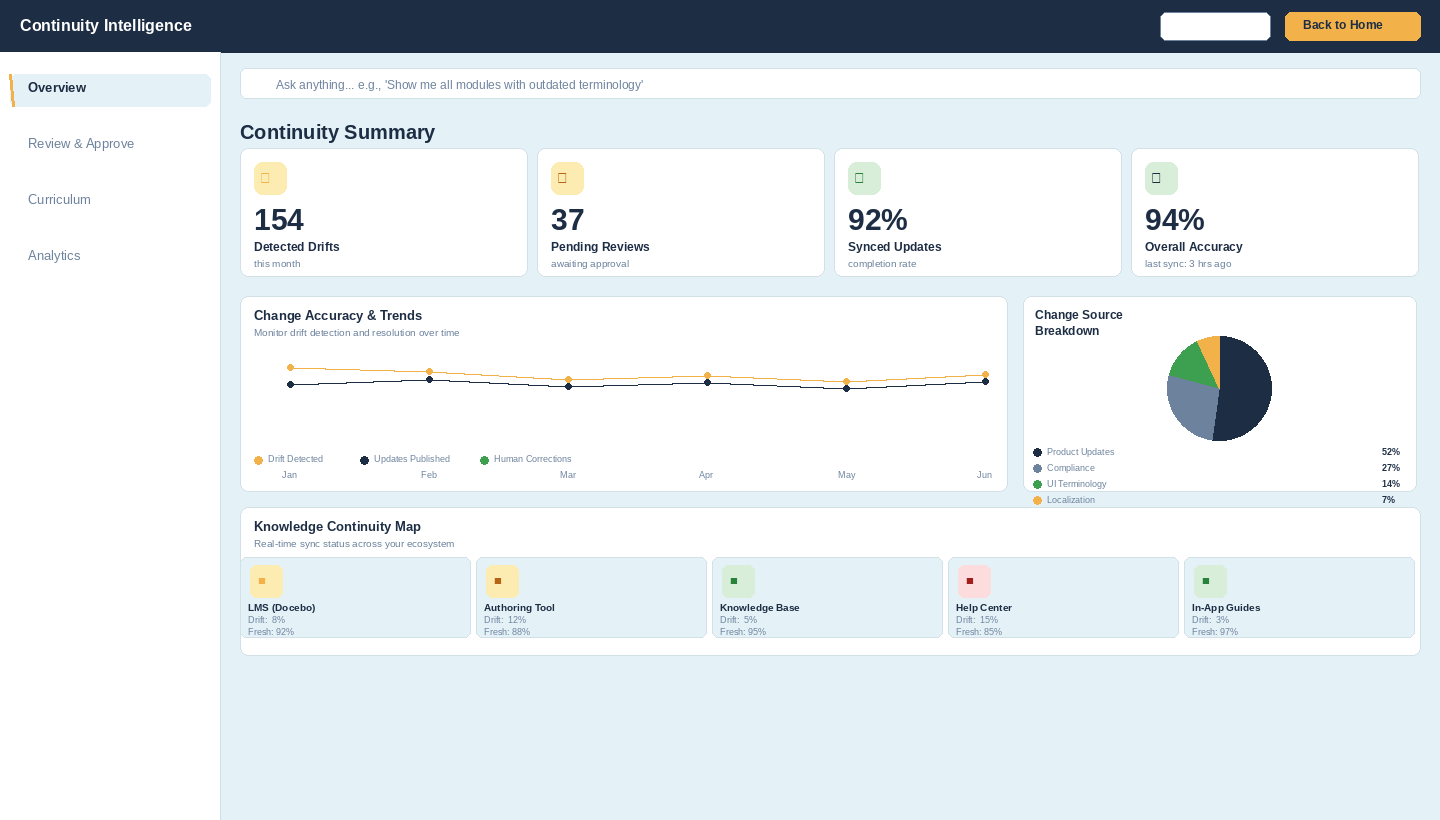
CI continuously compares your deployed courses, KB articles, and job aids against your source of truth.
Drift is detected and flagged
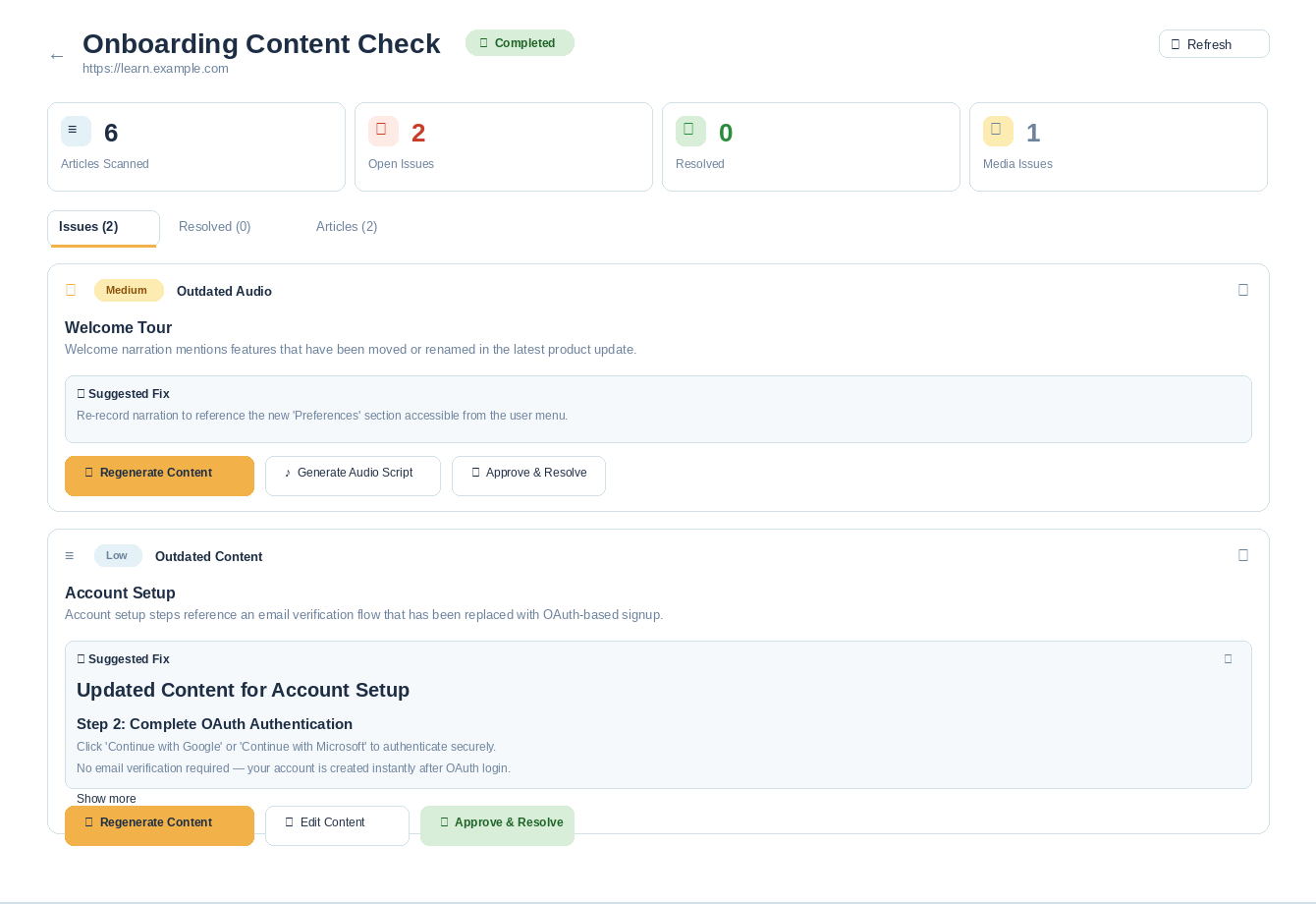
Every gap between what you published and what's currently true surfaces as a prioritized alert.
AI agents draft the updates
Revised content is generated automatically — course copies, KB articles, narration scripts.
Your team reviews and approves
Changes route into your existing workflow in Slack, Teams, or your LMS. One click to approve.
Updates sync back across your stack
Approved content is republished to Docebo, Confluence, Zendesk — wherever it lives.
When something changes
One change in. Every format updated.
Want to see steps 1–3 in action on your own content?
Get Your Free Drift Report →Who It's For
Built for enterprise content owners.
Continuity Intelligence is built for large enterprises — 5,000+ employees with portfolio-scale certification, compliance, and AI training content.
Certification Program Managers
Thousands of exam items, learning paths, and locale variants still reference guidance that changed releases ago.
Continuous objective-level validation across the whole certification portfolio, with accreditation-ready lineage.
Details →
Global AI L&D Leads
Your global learning corpus now feeds copilots and assistants — and nobody has audited what those models are learning.
Freshness scoring, contradiction detection, and provenance evidence across every region and business unit.
Details →
Heads of L&D (Enterprise)
At 5,000+ employees the library spans multiple LMSs and regions, with no system watching any of it for accuracy.
Portfolio health visibility rolled up by region, business unit, and compliance program.
Details →
Also used by enterprise teams in:
Customer Education
Stale customer academies create support tickets, not confident customers.
Education Services
Paid training delivery at scale breaks down when product updates outpace the course catalog.
Sales Enablement
Reps are certified on messaging that was updated two quarters ago.
Instructional Designers
You're the last to hear about a product update — and by then three courses are already wrong.
Content Strategists
You own the roadmap but can't see which published assets have silently gone stale.
60–70%
of revision time spent identifying what changed — not fixing it
Source: Enterprise L&D benchmarking data
3–6 mo
average gap between policy change and training update
Source: Brandon Hall Group research
$1M+
potential compliance exposure from outdated training content
Source: Deloitte compliance risk analysis
What You Get
What Your Drift Report Includes
File Compatibility Score
We accept any format your team actually uses — SCORM, video, PDF, HTML, DOCX. No reformatting required.
Specific Discrepancies Found
Line-by-line identification of outdated terminology, wrong steps, missing features, and stale policy references inside your uploaded file.
Prioritized Fix List
Every discrepancy ranked by severity and business impact so you know exactly where to start — delivered straight to your inbox.
Integrations
Works where you already work.


Healthcare systems
Integrates with the systems care teams already use.
 Athena / athenahealth
 Epic
Epic Oracle Health (Cerner)
 eClinicalWorks
 MEDITECH
 NextGen Healthcare
 Veradigm (Allscripts)
 DrChrono
 Greenway Health
+ Slack, Teams, Notion, Gainsight, WellSaid Labs, and more via API
Your last product release probably broke something in your training. Let's find out.
Upload any file. Get your drift report in 24 hours. Free.
Upload Your First File →